
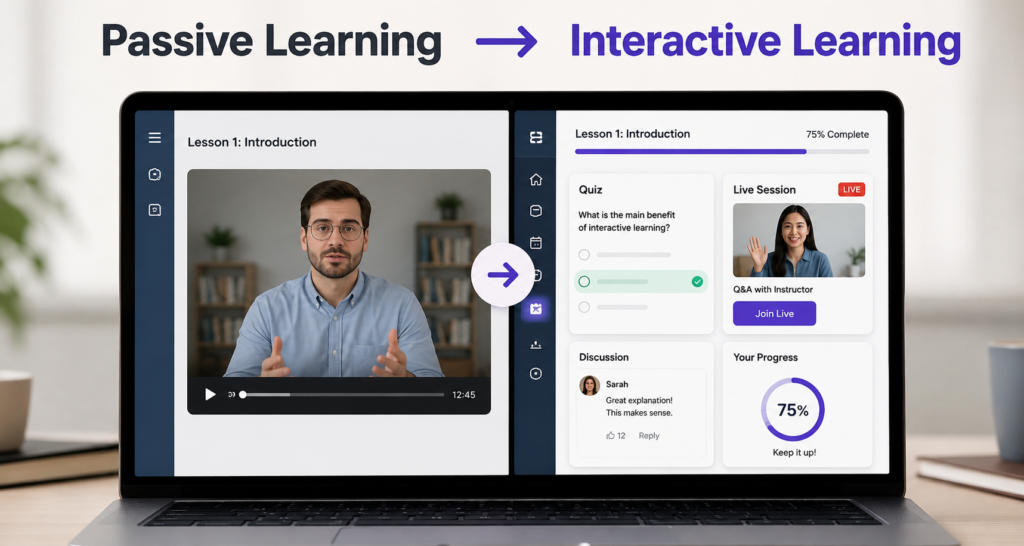
Students rarely leave a course because the content is bad. They leave because the learning experience feels passive. Watching one video after another makes it easy to lose focus and stop making progress.
Interactive online courses keep learners involved instead of asking them to watch from the sidelines. Quizzes, live sessions, discussions, gamification, and progress tracking all encourage learners to participate throughout the course.
The good news is that you don’t need to rebuild your course. Small interaction points added at the right moments can improve engagement, increase course completion, and create a better learning experience.
This guide explains how to make online courses more interactive with practical strategies you can apply today. You’ll also learn which LMS features make these ideas easier to implement as your course grows.
TL;DR
- You can make online courses more interactive by giving learners frequent opportunities to participate instead of only watching videos.
- Active learning methods like quizzes, discussions, and reflection activities keep learners engaged and improve knowledge retention.
- Live sessions, gamification, progress tracking, and learning communities help maintain motivation throughout the course.
- Short lessons with clear learning objectives make it easier for learners to stay focused and complete your course.
- Choose an LMS that supports interactive learning features, so you can build engaging courses without relying on multiple third-party tools.
Why You Should Make Your Online Courses More Interactive
Two learners can watch the exact same lesson on the exact same day. A week later, one can explain the idea back to you without notes. The other remembers the title and little else. The difference was not attention. It was retrieval: one of them had to use the idea before moving forward, and the other only had to watch.
This gap shows up in your completion data long before it shows up in your content quality. A well-produced course can still lose most learners by lesson four, because watching an explanation and applying it are two different skills. Watching builds exposure. Applying builds retrieval, and retrieval only happens when a learner has to recall or use an idea before they are allowed to continue.
Completion rate turns this from a learning problem into a business problem. A learner who finishes your course is far more likely to leave a review, refer a colleague, or buy your next course. A learner who stalls at lesson three does none of those things, no matter how well you built those first three lessons.
The good news is, fixing this does not mean rebuilding your course from scratch. It means finding the exact points where learners are currently just watching, then turning a few of them into moments where they respond. That could be a question after a concept learners tend to misread, a short exercise before the next lesson unlocks, or a prompt to apply what they just saw.
More interaction is not automatically better, and this is worth naming before you add any of it. A badge that motivates someone taking a hobby course can feel out of place to a learner taking the same course because their employer required it. A weekly live session that builds momentum for a small cohort becomes a scheduling headache for a self-paced audience spread across time zones.
Which strategy is worth building depends on your course and your learners, not on how much interactivity you can fit into a lesson. The next section breaks down how you can make your online courses more interactive in different course contexts.
Ways to Make Your Online Courses More Interactive
To build this list, we reviewed the engagement strategies used by successful course creators, learning platforms, and instructional design best practices. The tips below are organized by impact, helping you improve learner engagement before adding advanced features.
Tips 1: Create Active Learning Opportunities
A learner who watches a lesson and a learner who stops to answer a question, complete a task, or share an opinion experience that lesson very differently. The second learner has to think, recall, or apply what they just learned instead of simply moving on. That small moment of participation is what turns passive learning into active learning, making it one of the most effective ways to improve learner engagement and course completion.
Active learning is not limited to quizzes. It includes any moment where learners actively respond to the lesson instead of simply consuming it. Regular interaction keeps attention high, uncovers misunderstandings early, and helps learners remember concepts long after the lesson ends.
Different types of interaction work best in different situations:
- A short quiz after a technical concept. Three to five questions encourage learners to recall the idea in their own words instead of simply recognizing the correct answer.
- A real-world scenario after a process lesson. Present a practical situation and ask learners how they would solve it using what they just learned.
- A reflection question after a mindset or strategy lesson. A simple writing prompt helps learners connect the lesson to their own goals or experiences.
- A quick poll during a longer lesson. Polls break passive viewing, re-engage attention, and encourage learners to compare their thinking with others.
- A discussion prompt after a case study. Asking learners to explain their reasoning deepens understanding and encourages peer learning.
- A practical exercise before the next lesson unlocks. Completing a small task reinforces the lesson before learners move to more advanced topics.
Where this matters most
This works best in courses where learners need to remember, apply, or practice what they learn, including technical training, professional development, certification programs, and skill-based courses. It matters less in short informational or entertainment-focused courses where constant interaction can interrupt the learning experience.
Common mistake to avoid
Adding interactive activities after every lesson instead of where they create the most value. Too many quizzes, polls, or prompts quickly become repetitive and encourage learners to click through without thinking. Place interactions after difficult concepts, common sticking points, or moments where learners need to apply what they just learned.
If you’re building your course with Klasio, you can add quizzes, discussion prompts, assignments, and other interactive activities directly inside lessons. This lets learners participate throughout the course instead of waiting until the end of a module to check their understanding.
Tips 2: Try Real-Time Course Delivery
A recorded lesson can answer a question the learner already knew to ask. It cannot answer the question they did not know they had until they tried applying the idea and got stuck. That gap is exactly what live sessions are built to close, and it is why cohort-based courses often report stronger completion than fully self-paced ones.
Real-time delivery does not mean every lesson needs to be live. It means adding sessions where two-way conversation actually adds value, places where a learner benefits more from asking a question out loud than from watching another five-minute video. The lesson content stays recorded. The live layer sits on top of it.
This matters because some concepts only click through back-and-forth conversation. A learner stuck on a technical step can rewatch a video three times and stay stuck. The same learner can ask one question in a live session and move forward in two minutes. Live sessions also give learners a reason to show up on a schedule, which slows the drift that causes most self-paced courses to lose momentum.
Some formats work better than others, depending on what your course actually needs:
- Weekly Q&A sessions. Best for courses where learners hit similar sticking points at similar times. This keeps the format low effort while still catching common confusion early.
- Workshops tied to a specific skill. Useful when a concept is easier to demonstrate live than to explain in a recording, such as a process learners need to see done in real time.
- Coaching calls for smaller groups. Works well for premium or high-touch courses where learners expect direct access to you, not just to the content.
- Cohort-based lessons with a fixed start date. Effective when you want a group of learners to move through the material together, since shared pacing creates accountability that self-paced learners do not get.
Where this matters most
Live sessions work best for courses with an active audience in a similar time zone, courses that teach a skill people apply immediately, and courses where learners are willing to show up on a set day and time. A weekly call gives a small, motivated group a reason to keep going.
When to skip this
Skip live sessions if your audience is spread across time zones with no overlap, or if learners bought your course specifically because it is self-paced. Forcing a live component onto that audience turns a flexible product into a scheduling problem, and attendance will drop fast once learners realize they keep missing the sessions.
Klasio lets you schedule live cohort sessions through Zoom or Google Meet directly inside a course, so you can combine self-paced lessons with live sessions without sending learners to a separate tool to join.
Tips 3: Use a Variety of Learning Materials
A learner who struggles with a concept in video form often understands it instantly when they see it written out with a diagram beside it. The problem was never their attention. It was the format. One format does not fit every learner or every type of lesson.
Relying on video alone works for some topics and creates friction for others. A step-by-step technical process is often easier to follow as a written guide the learner can pause and reread. A mindset lesson often lands better as audio, something a learner can absorb during a commute instead of at a screen.
This matters because course fatigue often comes from format, not content. Watching video after video for hours feels repetitive, even when each video teaches something new. Mixing formats breaks that repetition and keeps the course feeling fresh from one lesson to the next.
Match the format to how the learner will actually use the content:
- Video for demonstrations. Best when the learner needs to see a process performed, such as using software or following a physical technique.
- PDFs or written guides for reference. Useful for anything the learner will revisit later, like checklists, formulas, or frameworks they need to look up again.
- Audio for theory or mindset content. Works when the learner can absorb the idea without watching a screen, such as during a commute or a walk.
- Worksheets or templates for practice. Gives the learner something concrete to apply, instead of only reading or watching.
Where this matters most
This matters most in longer or technical courses, where learners need to reference material repeatedly and sitting through video for everything becomes a chore. A short, simple course can often work in one format without any fatigue.
Common mistake to avoid
Choosing the format based on what is easiest to produce, not on how the learner will use it. Delivering reference material as a forty-minute video forces the learner to scrub back through it to find one number, when a one-page PDF would have removed that friction instantly.
Klasio lets you combine video, PDFs, audio, and downloadable resources inside the same course, so you can match each lesson to the format it actually needs instead of building everything in one medium.
Tips 4: Clearly Define Learning Objectives
A learner who does not know what a lesson is building toward tends to watch it the way someone watches TV with no goal in mind. A learner who knows exactly what they will be able to do by the end pays closer attention, because they are watching for something specific.
This is the gap that learning objectives close. A learning objective is a short statement at the start of a lesson that tells the learner what they will know or be able to do once it ends. Most course creators skip this step and jump straight into the content.
This matters because unclear expectations create passive attention. When a learner does not know what they are supposed to get from a lesson, they watch it the way they would watch any video, without a clear reason to focus on any one part of it.
Different lesson types call for different kinds of objectives:
- Skill objectives. Name a task the learner will be able to do, such as “split your list into three groups by purchase behavior.” These fit hands-on lessons where the learner applies something right away.
- Knowledge objectives. Name what the learner will understand, such as “explain when to use a broadcast email versus an automated one.” These fit lessons where the learner has to make a decision later.
- Outcome objectives. Name something the learner will produce, such as “write a three-email welcome sequence.” These fit project-based lessons where the learner leaves with something built.
Where this matters most
This matters most in structured, outcome-based courses where each lesson builds toward a clear skill or result. It matters less in browse-style or inspirational content, where the learner is not working toward a fixed outcome.
Common mistake to avoid
Writing the objective as a topic instead of an outcome. “Understand email segmentation” is a topic, and it tells the learner nothing about what they will walk away able to do. “Split your list into three groups by purchase behavior” is an outcome, and it gives the learner a clear result to aim for.
Klasio lets you add a short lesson description at the top of each lesson, so learners see the objective before the content starts playing, without needing a separate slide or intro video just to state it.
Tips 5: Gamify the Learning Experience
A learner earns a badge after finishing a module and opens the next one right away, even though they had planned to stop for the day. Nothing about the content changed. The small reward changed the decision to keep going, and that is exactly the effect gamification is built to create.
Gamification adds a layer of motivation on top of your content by rewarding progress as it happens. The content teaches the skill. The reward layer keeps the learner showing up long enough to finish it. It works on motivation, not on comprehension.
This matters because motivation drops in the middle of most courses. The excitement of signing up has faded, and the finish line still feels far away. Gamification gives learners small wins that make that middle stretch feel like progress instead of a slog.
Different reward elements fit different courses:
- Badges for finishing a module or milestone. Work for almost any audience, since they feel like recognition rather than competition.
- Points for smaller actions. Fit courses with many small tasks, where a single badge would feel too far away to motivate anyone.
- Streaks for showing up on consecutive days. Fit habit-based courses like language or fitness, where daily practice is the actual skill.
- Leaderboards for doing more than peers. Fit competitive cohorts learning together, but they can backfire with solo or self-paced learners.
Where this matters most
This matters most in long courses, habit-based courses, and cohorts, where staying motivated over time is the real challenge. A short course that a learner finishes in one sitting rarely needs it.
Common mistake to avoid
Turning on every game element at once before knowing whether your learners respond to reward or competition at all. A leaderboard that motivates one learner can embarrass another who sees their name near the bottom every week. Start with one element, such as a completion badge, and add more only if your data shows it changing behavior.
Klasio includes a points-based gamification system with badges and a leaderboard you set up from your dashboard, so you can reward the actions you want without adding a separate gamification tool.
Tips 6: Break Lessons Into Smaller, Focused Modules
A learner sees a lesson marked “45 minutes” and decides to watch it later. Later never comes. The same learner sees “6 minutes” and presses play right away. The content inside might be identical. The length alone decided whether they started at all.
Breaking lessons into smaller modules means splitting long lessons into short segments that each teach one idea. Instead of one long video covering a whole topic, you build several short lessons. The total runtime stays about the same, but the learner takes it in finishable pieces.
This matters because long lessons raise the cost of starting. A learner has to find a long, uninterrupted block of time before they can begin, and that block rarely appears in a busy week. Short lessons remove that barrier, since a learner can finish one during a break and still feel real progress.
Short lessons also help in ways that go beyond starting:
- They create more places for interaction. A forty-minute lesson has one obvious spot for a quiz. Six short lessons give you six natural checkpoints.
- They make progress feel faster. Each completed lesson is a small win, and a course of twelve short lessons feels more active than one of three long ones.
- They are easier to update. When one idea changes, you re-record one short lesson instead of a long one covering many topics.
Where this matters most
This matters most in beginner courses and dense technical topics, where learners overload easily and need clear stopping points. A course for advanced learners who expect deep, uninterrupted sessions may not need the same level of splitting.
Common mistake to avoid
Splitting so far that each piece runs thirty seconds, which makes learners spend more time clicking between lessons than learning. Keep each module focused on one complete idea, usually three to ten minutes. If you cannot describe what a lesson teaches in one sentence, it is covering too much.
Klasio’s course builder lets you organize lessons into sections and reorder them by dragging and dropping, so you can split a long lesson into shorter ones and rearrange the flow without rebuilding your whole course structure.
Tips 7: Create a Personal Connection With Your Learners
A learner who feels like a real person is teaching them behaves differently from one who feels like they bought a faceless video library. The first learner emails questions, finishes lessons, and comes back for your next course. The second quietly disappears when the material gets hard.
Creating a personal connection means showing up as a real person throughout the course, not just in the sales pitch. A welcome message, a personal reply, or a short check-in makes the learner feel supported instead of alone. That feeling of support is often what keeps them going when the content gets difficult.
This matters because online courses have a loneliness problem. A learner working through your course by themselves has no one to turn to when they get stuck or lose motivation. Small personal touches replace some of that missing support and keep the learner from giving up in silence.
A few touchpoints carry most of the weight:
- A welcome message on day one. Sets the tone and tells the learner a real person is behind the course, not just a checkout page.
- Personalized emails at key moments. A note when a learner completes a module, or a check-in when they go quiet, feels different from a generic newsletter.
- Timely feedback on submitted work. When a learner submits an assignment and hears back from you, the course stops feeling one-directional.
- Course announcements in your own voice. Regular updates remind learners the course is active and you are still present.
Where this matters most
This matters most in high-touch, premium, and cohort courses, where learners expect access to you as part of the price. In a low-cost, self-paced course sold at scale, heavy personal contact may not be practical, and automated touchpoints have to carry more of the load.
Common mistake to avoid
Making the connection feel automated and generic. A “Hi {first name}” blast that clearly went to everyone can feel worse than no message at all. Personal does not mean frequent. One message that actually speaks to where the learner is beats five that read like templates.
Klasio lets you send course announcements and automated emails tied to learner actions, so you can stay in touch at the right moments without writing every message by hand.
Tips 8: Build a Learning Community
A learner who is part of a group behaves differently from one learning alone. When they get stuck, they ask the group instead of quitting. When they see others making progress, they feel pulled to keep up. That social pull is something content alone cannot create.
Building a learning community means giving learners a place to ask questions, share progress, and support each other. It turns your course from a solo experience into a shared one. The community becomes a reason to stay that has nothing to do with the next lesson.
This matters because community creates switching costs that content cannot. Leaving a course is easy. Leaving a group of people you have been learning alongside is harder. A learner who feels they belong is far less likely to drop off when the material gets tough.
A community adds value in a few specific ways:
- Peer answers reduce your support load. Learners answer each other’s questions, so you are not the only source of help.
- Shared progress builds momentum. Seeing others hit milestones motivates learners to keep moving through the course.
- Discussion deepens learning. Explaining an idea to a peer forces a learner to understand it better than watching alone ever would.
Where this matters most
This matters most in cohort courses, long programs, and skill-based topics where learners benefit from feedback and shared practice. It matters less in short, transactional courses that a learner finishes in one sitting and never needs to return to.
Common mistake to avoid
Building a community space and expecting it to run itself. An empty forum or a silent group chat signals a dead course and can hurt more than having no community at all. A community needs early seeding, prompts, and your presence until learners start carrying the conversation themselves.
Klasio does not offer a full community forum, so if discussion is central to your course you will likely pair it with a dedicated community tool. What Klasio does give you is a built-in blog your students can follow, plus announcements, which keep learners connected to updates between lessons.
Tips 9: Show Learner Progress
A learner who can see they are 70 percent through a course finishes it far more often than one who has no idea how far they have come. The visible progress itself becomes a reason to continue. Nobody likes abandoning something they are most of the way through.
Showing progress means making a learner’s advancement visible at every stage. Progress bars, completion percentages, milestones, and certificates all turn invisible effort into something the learner can see. That visibility changes how the learner feels about continuing.
This matters because progress you cannot see feels like progress you did not make. A learner three lessons into a course with no progress indicator has no sense of momentum. The same learner watching a bar fill toward 100 percent feels pulled to complete it.
Different progress cues do different jobs:
- Progress bars. Give a constant, at-a-glance sense of how far the learner has come and how much is left.
- Completion percentages. Turn progress into a specific number, which makes the goal feel concrete and close.
- Milestone markers. Break a long course into smaller wins, so the learner celebrates progress before the very end.
- Certificates on completion. Give the learner a tangible reward and proof of achievement they can share.
Where this matters most
This matters most in long courses and structured programs, where the finish line is far away and learners need reassurance they are moving toward it. A short course finished in one sitting benefits less, since the learner can already see the end.
Common mistake to avoid
Showing progress only at the very end, with a single certificate and nothing along the way. By then, many learners have already dropped off. Progress needs to be visible early and often, so the learner feels momentum before they reach the point where most people quit.
Klasio shows learners their progress as they move through a course and issues certificates automatically on completion, so learners always know where they stand and get recognition the moment they finish.
What to Look for in an Interactive Course Platform
The strategies in this guide are much easier to implement when your course platform includes the right learning tools. Before choosing an LMS, check whether it supports the features you’ll need to create an engaging learning experience.
f you’re evaluating different LMS solutions, comparing the available online course platforms can help you understand which features matter most for your teaching style.
Look for a platform that includes:
- Built-in quizzes for knowledge checks and instant feedback.
- Live classes for workshops, coaching, and Q&A sessions.
- Progress tracking to keep learners motivated.
- Discussions that encourage learner participation.
- Certificates to recognize course completion.
- Notifications that keep learners informed and engaged.
If you’ve been following this guide, you’ll notice these are the same features used throughout the strategies above. Klasio includes many of them in a single platform, making it easier to create interactive online courses without relying on multiple tools or plugins.
What Is the Best Tool for Creating Interactive Online Courses?
There is no single best tool, because the right one depends on which strategies you actually plan to use. A creator who only needs quizzes and progress tracking has different requirements from one running weekly live cohorts with an active community. Start from the strategies you chose above, then find the platform that supports those specific ones well.
Most course creators start by stitching tools together. A quiz plugin here, a separate webinar tool there, a community app on the side. This works at first, but every added tool is another subscription to pay, another login for learners, and another thing that can break when one of them updates. The cost is rarely the monthly fee. It is the time you spend keeping the pieces connected.
Klasio, an AI-powered course-building platform, brings several of these interactive features into one platform. You can build quizzes, host live cohort sessions through Zoom or Google Meet, track learner progress, issue certificates automatically, send course announcements, and deliver video, audio, and PDF lessons together. For creators who want quizzes, progress tracking, live sessions, and certificates without managing separate tools, keeping them in one place removes most of the maintenance work.
Klasio is not the right fit for every strategy on this list. If your main goal is a large, feature-rich community with threaded discussions, member profiles, and separate channels, a dedicated community platform will do that better than any all-in-one tool. If you rely on advanced gamification like detailed point economies and competitive leaderboards, a specialist gamification tool will go deeper. And if you need SCORM support or complex adaptive learning paths, a traditional enterprise LMS is built for that in a way Klasio is not.
So the honest recommendation depends on how you weigh simplicity against depth. Choose Klasio if you want the core interactive features, quizzes, live sessions, progress tracking, certificates, and mixed media, working together in one platform with less to manage. Choose a specialist tool, or a combination of them, if one specific strategy like deep community or advanced gamification is the center of your course and you are willing to manage more tools to get it.
If Klasio’s feature set matches the strategies you plan to use, you can start with a free account and test how it fits your course before committing to anything.

Frequently Asked Questions
How do you measure learner engagement in an online course?
You can measure learner engagement by tracking metrics like course completion rates, lesson completion, quiz participation, discussion activity, attendance in live sessions, and learner feedback. Looking at these metrics together gives you a clearer picture of how actively learners participate throughout your course.
What are the biggest mistakes that make online courses feel boring?
Long video lectures, limited learner interaction, unclear learning objectives, and a lack of feedback are some of the most common mistakes. Courses that rely on passive learning often struggle to keep learners engaged from beginning to end.
How often should you add interactive activities to an online course?
Interactive activities should appear naturally throughout your course instead of only at the end of each module. Adding quizzes, discussion prompts, reflection questions, or practical exercises after important concepts helps learners stay engaged without interrupting the learning experience.
Can too much interactivity distract learners?
Yes. Too many quizzes, pop-ups, or activities can interrupt the learning flow and overwhelm learners. Every interactive element should support a learning objective rather than being included simply to make the course feel more interactive.
Should every lesson include an interactive activity?
Not every lesson needs an interactive activity, but every module should encourage learner participation in some way. Choose interaction when it reinforces learning, such as after introducing a new concept or before moving to a more advanced topic.
How long does it take to make an existing online course more interactive?
The timeline depends on the size of your course and the changes you plan to make. Simple improvements like adding quizzes, discussion prompts, or progress tracking can often be completed in a few days, while redesigning an entire course may take several weeks.
Can interactive online courses improve course completion rates?
Yes. Interactive online courses often achieve higher completion rates because learners stay engaged throughout the learning process. Activities like quizzes, live sessions, discussions, and visible progress tracking encourage learners to keep participating until they finish the course.




Leave a Reply