
You poured your heart and countless hours into creating your online course. But now you face the constant pressure of marketing your course. With marketing comes the endless need for new blog posts, social media updates, and email newsletters.
Now, what if the solution isn’t to create more, but to leverage what you already have? Your course is a massive library of high-value content waiting to be unlocked. This is the power of repurposing.
In this guide, we’ll walk you through a simple, 5-step framework to strategically repurpose your course content into a diverse content ecosystem.
Step 01: Audit Your Course Content
Before you can start turning your course material into a whole new set of content, you need to know exactly what you’re working with. Think of this first step as taking inventory of your course assets. You’ve already put in the hard work to create your course, so now it’s time to see all the individual pieces you can use.
Here is how to conduct your quick audit:
a. List Everything: Make a complete list of every asset. This includes your lesson videos, the transcripts you might have, your presentation slides, any quizzes, and all the handouts or worksheets you created. A simple spreadsheet works perfectly for this.
b. Identify the “Gold”: Not all content is created equal. You want to focus your repurposing efforts on the lessons that are already performing well. Look for:
- Topics your students rave about.
- Videos with the highest completion rates.
- Lessons that are evergreen (relevant for years to come).
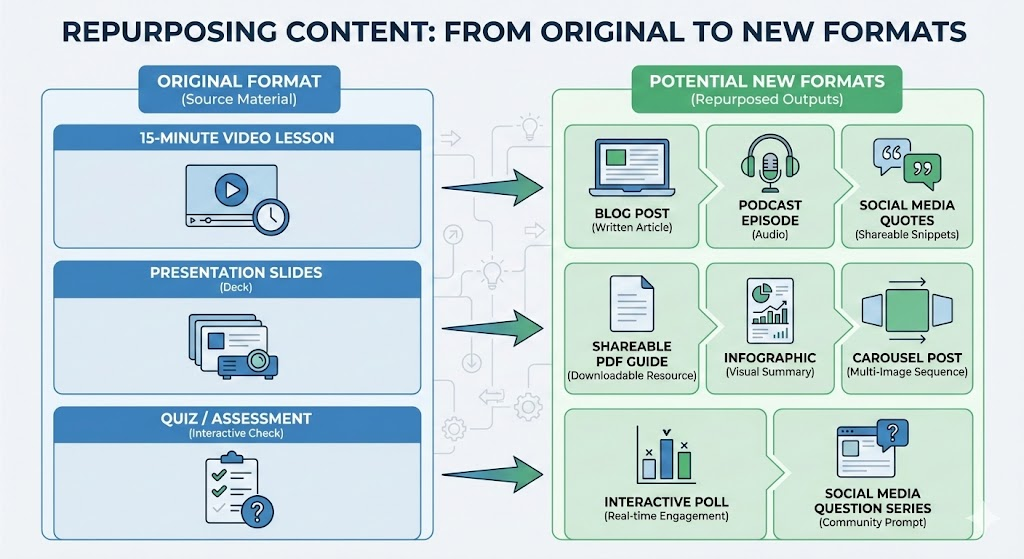
c. Map the Transformation: For each piece of “Gold,” start brainstorming its potential new life. Don’t limit yourself to the original format.
To help you visualize, here are a few examples of how you can transform your existing assets:
Step 02: Define Your Goal, Audience, and Platform
Repurposing isn’t just about turning a video into a blog post; it’s about doing it with a purpose. If you just throw content out there without a plan, you won’t see the results you want. This step is all about defining the strategy behind your new content.
a. Define Your Goal: The “Why”
Before you start converting anything, ask yourself: What do I want this new piece of content to achieve? Your goal will determine the format and the platform you choose.
| If your goal is… | Then the content should be… |
| Lead Generation (getting email sign-ups) | A free checklist, a mini-course, or a detailed e-book (gated content). |
| Social Media Engagement (getting likes, shares, comments) | Short, visually engaging clips, infographics, or quick tips. |
| Driving Traffic (getting people to your website) | A full blog post or a YouTube video with a strong call-to-action (CTA). |
b. Know Your New Audience: The “Who”
You already know your course students, but the audience for your repurposed content might be different. Are you trying to reach people who have never heard of you (cold audience), people who follow you but haven’t bought anything (warm leads), or your existing students?
- Cold Audience: Needs content that introduces your expertise and solves a quick, surface-level problem. (e.g., a short, viral tip).
- Warm Leads: Needs content that builds trust and shows the depth of your knowledge, encouraging them to sign up for your email list or a free masterclass. (e.g., a detailed blog post).
- Existing Students: Needs content that supports their learning or encourages them to buy your next course. (e.g., a bonus worksheet or a deep-dive podcast).
c. Platform Selection: The “Where”
After defining your goal and understanding your audience, the next step is choosing the right platform. Focus on where your audience already spends their time, and match your content format to the platform. For instance,
- LinkedIn: Ideal for professional, in-depth content such as articles, case studies, and B2B insights. Great for networking and establishing authority in your industry.
- Instagram / TikTok / YouTube Shorts: Best for short, visually engaging videos, quick tips, and trends. Perfect for building brand awareness and social engagement.
- Your Blog / Website: The go-to place for long-form, SEO-optimized content that you fully control. Excellent for driving traffic, nurturing leads, and establishing thought leadership.
Pro tip: Don’t spread yourself too thin. Focus on 1–2 platforms where your audience is most active and tailor your content to each platform’s style.

Step 03: Deconstruct and Convert Your Course Content
This is where the magic happens. You’ve audited your content, and you have a clear strategy. Now, it’s time to actually take your course assets apart and rebuild them into new, exciting formats.
We can break this down into three main types of transformation:
a. Text-Based Repurposing
Text is the most versatile format because it is searchable (great for SEO) and easily skimmable.
- The “Module-to-Article” Method: Treat every individual video lesson as a standalone blog post topic. Use a transcription tool to generate a text draft, then edit it to remove conversational filler, add clear headings (H1, H2), and insert screenshots from your slides. If your course has 50 lessons, you instantly have 50 draft blog posts.
- The “E-Book / Whitepaper” Compilation: Bundle related text transcripts into a downloadable PDF lead magnet. For example, take all lessons from your foundational module and format them into a cohesive PDF guide. Use this as a “Free Chapter” lead magnet to capture email addresses.
- LinkedIn Articles & Newsletters: Extract the core philosophy or a contrarian insight from your course intro. Publish this as a long-form article on LinkedIn to build your professional authority.
- Email Drip Campaigns: Take the key takeaways from your course and turn them into a 5-day educational email challenge (a nurture sequence).
b. Visual & Social Repurposing
Social media feeds on volume and visuals. Your course slides and diagrams are ready-made assets for this.
- Slide Decks to Carousels: Export your presentation slides as individual images. Select the 5-10 most impactful slides from a lesson and upload them as a PDF carousel on LinkedIn or a carousel post on Instagram. Tip: Ensure the font size is large enough to read on mobile.
- “Quote Card” Extraction: Scan your script for “tweetable” one-liners or punchy definitions. Place these text snippets over a branded background or a photo of you speaking. This is great for high-frequency visibility.
- Infographics & Cheatsheets: If you have a framework, flowchart, or checklist in your course, have a designer polish it into a standalone infographic. These are highly shareable on Pinterest and X (Twitter).
c. Audio & Video Repurposing
Video is the native format of most courses, making it the easiest to splice and distribute for maximum reach.
- The “Podcast Swap”: Strip the audio from your video lessons. Add a generic intro and outro music track. Upload these as podcast episodes. Note: This works best for “theory” lessons that don’t require visual demonstration.
- YouTube “Teaser” Clips: Upload full lessons (or edited highlights) to YouTube. Optimize the title for search (e.g., “How to [Lesson Topic]”). Crucial Step: Include a strong Call-to-Action (CTA) in the video description linking to the full course.
- Vertical Video (Shorts/Reels/TikTok): Find the “lightbulb moment” in your lesson—the 30-60 seconds where you explain the most critical concept. Crop the video to 9:16 (vertical), add captions (essential for mobile), and post as a Reel or TikTok for viral reach.
Step 4: Add Your Personal Branding for More Profit
You’ve done the hard work of transforming your content. Now, you need to package it up so it looks professional and works hard for your business. This step is about making sure your new content is both a great asset and a consistent reflection of your brand.
a. Create New Products
One of the biggest wins of repurposing is that you can create entirely new products without writing a single new word. Look at your transformed content and see where you can group it together for a new offering:
- E-book or Printed Guide: Combine a series of related blog posts (which came from your transcripts) into a comprehensive e-book. This can be a low-cost product or a high-value lead magnet.
- Masterclass or Workshop: Take a single, high-value module from your course and turn it into a paid, live masterclass or a recorded workshop. This is a great way to introduce people to your teaching style.
- Themed Series: Group short video clips into a themed YouTube playlist or a short video series on a platform like Instagram or TikTok.
b. Ensure Cohesion and Consistency
When you pull content from different places, it can sometimes feel disjointed. Your goal is to make sure all your new content feels like it came from the same source—your brand.
To ensure your branding on your content, apply the same colors, fonts, and logo to all your new visuals (infographics, PDFs, slides). Even if you’re editing a transcript, make sure the final text sounds like you. If your course is friendly and casual, your blog posts should be too.
Always check for outdated statistics, broken links, or old examples. A quick update makes old content feel brand new.
c. Add a Clear Call-to-Action (CTA)
Every single piece of repurposed content should have a clear next step for the reader or viewer. This is how you connect the new content back to your main course.
The CTA should always guide the audience toward the original course or your email list. For example, if the content is a free checklist, the CTA should be: “Ready for the full system? Enroll in the complete [Course Name] today!”
Step 05: Distribute Your Content and Track Progress
You’ve created amazing content; now it’s time to get it in front of your audience and see what sticks.
Start by planning your rollout with a simple content calendar so you stay consistent across all your platforms. Make every piece count: each post, video, or infographic should point your audience back to your course and show them the transformation they can get.
Cross-promote wherever you can. Share your blog on your podcast, post your infographic to your email list, or drop your video snippets on social media to maximize reach.
Keep an eye on views and impressions to see who’s seeing your content, and track shares and saves to understand what your audience values. Monitor email sign-ups to measure new leads, and check course page traffic to see what’s driving sales.
Use these insights to double down on what works and tweak what doesn’t. Maybe adjust posting times, improve your call-to-action, or focus on the formats that perform best.
Bonus Section: The Repurposing Content Tech Stack
You don’t need a massive budget or a team of designers to make repurposing work. There are fantastic, often free or low-cost tools that can handle the heavy lifting for you. Here is a quick look at the essential tech stack for the beginner course creator:
| Tool Category | Recommended Tool (Example) | Purpose in Repurposing |
| Transcription & Editing | Descript or Otter.ai | Converts video/audio lessons into editable text drafts and allows for text-based video editing. |
| AI Video Clipping | Opus Clip or Pictory | Automatically finds the best “viral” moments in your long videos and formats them for vertical social media. |
| Visual Design | Canva | Creates branded quote cards, infographics, and carousel posts quickly using templates. |
| E-book & PDF Creation | Designrr or Google Docs | Formats and exports your compiled text content into professional-looking lead magnets and e-books. |
| Podcast Recording/Editing | Riverside or Podcastle | Records high-quality remote interviews and provides tools for cleaning up audio for podcast episodes. |
| Content Scheduling | Buffer or Later | Plans and automatically posts your repurposed content across multiple social media platforms. |
| Workflow Automation | Repurpose.io | Automates the cross-posting of content (e.g., automatically turning a YouTube video into a Facebook video and an audio podcast). |
05 Common Mistakes You Need to Avoid While Repurposing Your Course Content
Even with a great plan, it’s easy to stumble. Learning from common mistakes will save you time and ensure your repurposed content is effective. Here are a few pitfalls to watch out for:
Mistake 01: Ignoring Platform Native Formats
This mistake happens when you repurpose content without adapting it to the specific format requirements of each platform. For example, using a horizontal video (16:9) created for YouTube on vertical-oriented platforms like Instagram Reels or TikTok.
Failing to match the platform’s preferred format can make your content look unprofessional, reduce engagement, and limit its reach.
Posting horizontal videos designed for YouTube (16:9) on Instagram Reels or TikTok can result in black bars and lower engagement, making your content look unprofessional.
So, to avoid this mistake, always format your content according to the platform’s native requirements: vertical (9:16) for Reels, Shorts, and TikTok, and square (1:1) or horizontal (16:9) for YouTube or blog posts.
Mistake 02: Lack of Brand Cohesion
When your content uses inconsistent fonts, colors, logos, or visual styles across blog posts, social media, and e-books, it can feel disjointed and unprofessional. This inconsistency makes it harder for your audience to recognize your brand and weakens the overall impact of your content.
By maintaining a consistent brand kit, you ensure every piece of content is instantly recognizable and builds trust with your audience.
Mistake 03: Overloading Your Audience
Posting too much content at once can overwhelm your audience and reduce engagement. When followers are bombarded with multiple posts in a short period, your messaging can get lost, and even high-quality content may be ignored.
To avoid this, pace your content with a consistent schedule and focus on delivering value with each piece, giving your audience time to absorb and act on it. Thoughtful timing ensures your content makes an impact without overwhelming your followers.
Mistake 04: Neglecting SEO
Repurposed content is useless if people can’t find it. Ignoring SEO best practices, keyword optimization, or descriptive captions can limit your reach.
Whether it’s blog posts, videos, or social media content, always optimize titles, descriptions, and tags to increase discoverability and attract the right audience.
Mistake 05: Using One-Size-Fits-All Messaging
Not every piece of repurposed content should be identical across platforms. Audiences behave differently on LinkedIn, Instagram, TikTok, or YouTube.
Using the same tone, style, or messaging across all platforms can reduce engagement. Tailor your content to fit the platform and audience while keeping your core message consistent.
Conclusion
With this 5-step guide to repurposing course content, you now have an unlimited source of content ideas to boost your visibility and reach a wider audience. And if you’re still finding it challenging, drop a comment below. Our team will be happy to help you get started and make the most of your content.




Leave a Reply